
A coupon campaign gives customers a defined coupon code that can unlock a reward under rules set by the business. Instead of running an open-ended promotion, you can decide how often the coupon may be used, how many total uses are available, what the customer receives and how long the campaign and reward remain valid.
In Letstamp, these controls are part of the coupon campaign setup. A coupon can provide either Reward Points or a Reward Card, making the model useful for offers ranging from a fixed points reward to a free product or defined discount reward.
What do you need to create a coupon campaign?
A complete coupon campaign needs a campaign name and description, campaign duration and visibility, a coupon code, a usage frequency, an optional quantity limit, and a reward.
The reward can be configured as Reward Points or a Reward Card. You can also define how long the earned reward remains available after the customer receives it.
Start with the purpose of the coupon
Before choosing a code or reward, decide what action the coupon should encourage. A campaign built for a grand opening may need different limits from a reusable weekly promotion. A short seasonal offer may need a campaign end date, while an ongoing partner code may remain available until you manually stop it.
This distinction matters because the offer itself is only one part of the campaign. The usage rules determine how frequently customers can benefit, while the reward settings determine what they actually receive after using the coupon.
How to create a coupon campaign in Letstamp
The setup can be divided into a few practical decisions. Work through them in order so the customer-facing offer and the operational limits remain consistent.
1. Name and describe the campaign
Add a campaign name, a short description and a detailed description that clearly explain the offer and its important conditions.
2. Set campaign duration
Keep the campaign unlimited until you stop it manually or use a timed campaign with a defined end date.
3. Create the coupon code
Choose the code customers will use, such as NEWYEAR2026 or another code that fits the promotion.
4. Choose usage frequency
Decide whether each customer can reuse the coupon one time, hourly, daily, weekly, monthly or according to another available frequency.
5. Set the coupon quantity
Define a maximum number of coupon uses when you need a limit. Leave the quantity at 0 when the campaign should have no quantity limit.
6. Configure the reward
Choose Reward Points or a Reward Card, describe the reward and define how long it remains valid after it is earned.
Write a coupon offer customers can understand immediately
A coupon should answer the customer's main questions without requiring them to interpret the campaign. What will they receive? How do they qualify? Can they use the code again? When does the offer or reward expire?
For example, a campaign name such as “Grand Opening Coupon” can be supported by a short description such as “Get a free coffee with our opening coupon.” The detailed description can then explain the usage limit and reward expiration. Keeping these roles separate makes the campaign easier to scan without hiding important conditions.
Coupon usage frequency and coupon quantity are different settings
These two controls can look similar, but they solve different campaign-management problems. Usage frequency determines how often an individual user can reuse the coupon. Coupon quantity determines how many times the coupon can be used before the configured quantity is exhausted.
| Setting | What It Controls | Example Use |
|---|---|---|
| One-Time Usage | A user can use the coupon once. | A single-use launch or event offer. |
| Daily Usage | A user can reuse the coupon according to the daily frequency. | A promotion designed for repeated visits. |
| Weekly or Monthly Usage | Reuse is controlled over a longer recurring period. | An ongoing benefit that should not be available every day. |
| Coupon Quantity | Limits the total number of permitted coupon uses. | A campaign available for a defined number of redemptions. |
What happens when a customer uses the coupon?
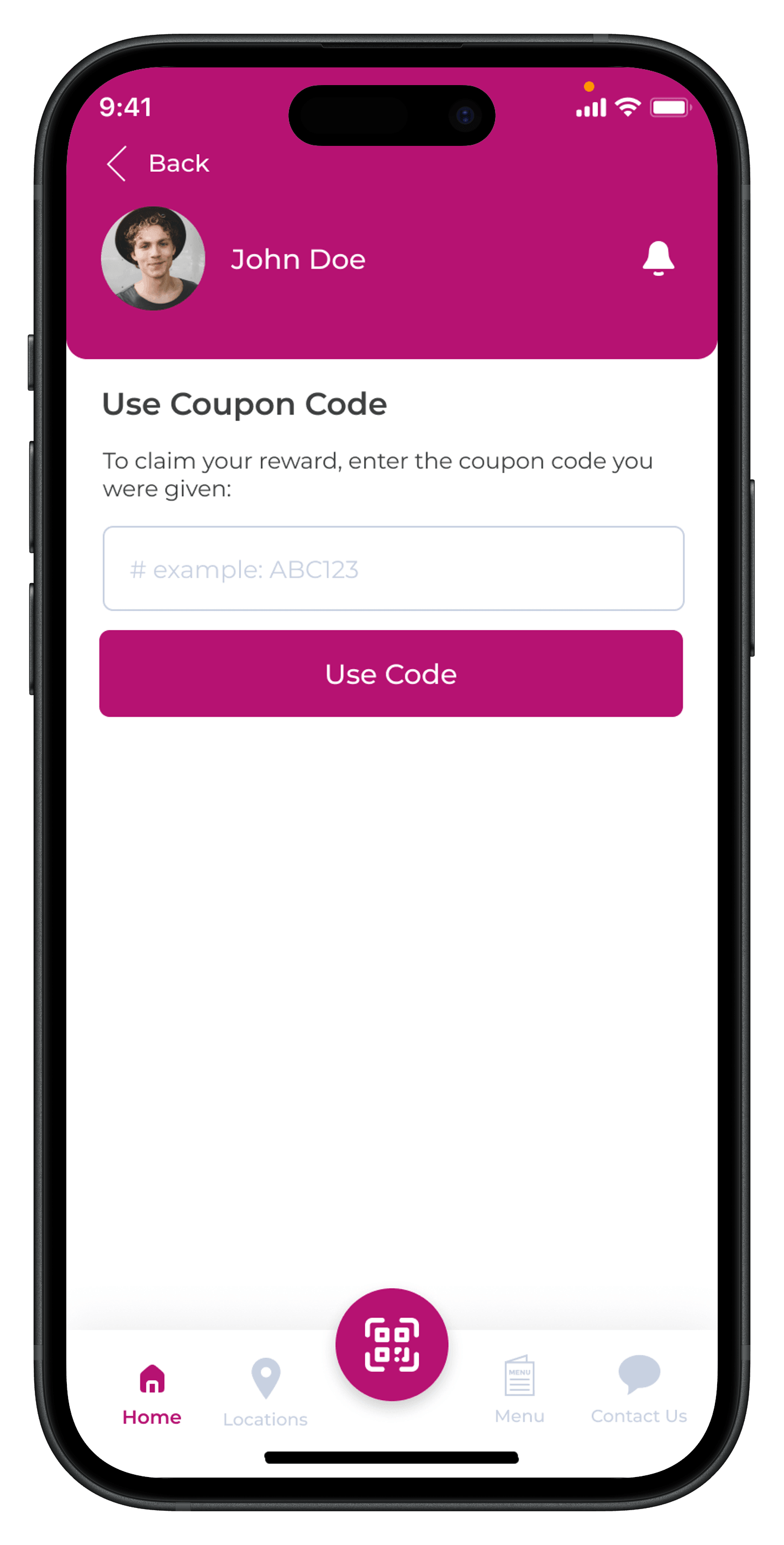
The coupon is created and provided by the business. In the Letstamp mobile experience, customers can access the coupon and use it to claim the configured reward.
That makes the reward description especially important. The customer should understand exactly what is being added after the coupon is used and any conditions that apply to that reward.
See how customers use LetstampChoose between Reward Points and a Reward Card
Letstamp coupon campaigns can provide the customer with either Reward Points or a Reward Card. The better choice depends on whether you want to add a flexible points amount or provide a specific reward such as a defined product or discount.
| Reward Type | How It Works | Branch Selection |
|---|---|---|
| Reward Points | The configured Reward Points amount is provided as the coupon reward. | Branch selection is not available for Reward Points. |
| Reward Card | A defined reward such as a product, discount or other reward card benefit is provided. | Earning and redeemable branch selections are required. |
If your strategy is centered on points rather than a specific coupon reward, you can also review how Loyalty Points & Cashback works as a separate loyalty model.
Set expiration rules for both the campaign and the reward
There are two separate time decisions to make. First, the campaign itself can be unlimited or timed. An unlimited campaign continues until you manually stop it, while a timed campaign ends on the date you define.
Second, you can determine the reward expiration period. This controls how long the customer has to use the reward after earning it. Keeping these settings separate gives you more control over campaigns where customers can earn a reward near the campaign end date but still need a defined period in which to use it.
Use campaign visibility deliberately
Coupon setup also includes campaign visibility. If you do not want customers to see the campaign, campaign visibility can be disabled. This setting is useful to review together with the way you plan to distribute or communicate the coupon.
For campaigns promoted to existing customers, Letstamp's customer segmentation can help you identify groups based on customer behavior. You can then use selected customer lists with push notifications or SMS messaging to support campaign communication.
Coupon campaign ideas for different situations
The same campaign module can support different promotional concepts simply by changing the code, usage rules, reward and duration. The important part is to make the configuration reflect the actual offer you want customers to receive.
Grand Opening Coupon
Pair a launch-focused code with a clear reward and a suitable campaign duration.
Seasonal Coupon
Use a timed campaign for a promotion designed around a defined holiday or seasonal period.
Limited Promotion
Set a coupon quantity when the offer should stop after a defined number of uses.
Coupon campaign checklist before publishing
Review the complete setup before making the campaign available. Small inconsistencies between the marketing message and campaign settings can make an otherwise simple offer confusing.
- Confirm that the campaign name clearly identifies the offer.
- Make sure the short and detailed descriptions explain the reward.
- Verify the coupon code before sharing it with customers.
- Check whether the usage frequency matches the intended promotion.
- Confirm whether the coupon needs a quantity limit.
- Review the campaign end date or unlimited campaign setting.
- Choose the correct reward type: Reward Points or Reward Card.
- Define the reward expiration period.
- If using a Reward Card, review earning and redeemable branches.
- Check campaign visibility before publishing.
Combine coupons with a broader loyalty strategy
Coupons work well for defined promotional moments, while an ongoing loyalty program can reward customer behavior over a longer period. Understanding the difference between campaigns and loyalty programs can help you decide where coupons fit in your overall retention strategy.
For example, a coupon may support a limited promotion while digital stamp cards reward repeat purchases over time. You can also use new customer campaigns when the goal is specifically to reward a customer's first interaction rather than distributing a reusable coupon code.
Create your first coupon campaign with Letstamp
Configure your coupon code, usage rules, reward and campaign duration from one loyalty platform, then connect the campaign with the customer communication tools that fit your strategy.